Facial, Bib and Time Recognition
BossFotos has Facial Recognition technology which is a vital tool for minimising the time customers spend finding photos of themselves from an event. It also saves photographers from having to create a myriad of time specific galleries.
We also have Bib Recognition technology so a competitor who wears a race number can search via that number to find their photos.
Bossfotos also has a Time Filter Feature (eg a runner can look for competitors who crossed the line at 10.05am). It is imperative that you have your time set correctly before the event and also synchronise your time with any other photographers covering the event.
Photo Gallery Size
Our Facial Recognition technology allows competitors to instantly find photos of themselves in a gallery containing 1000’s of photos so theoretically there is not limit to the gallery size. However, the reality is that many competitors enjoy scrolling through the photos (which is helpful as they may alert their friends to the presence of photos) so it makes sense to put them in logical galleries – eg 1km Race start, 2km Race Finish etc.
Indexing the photos and errors
Facial Recognition Indexing is kicked off automatically if you check the facial recognition box when creating a gallery.
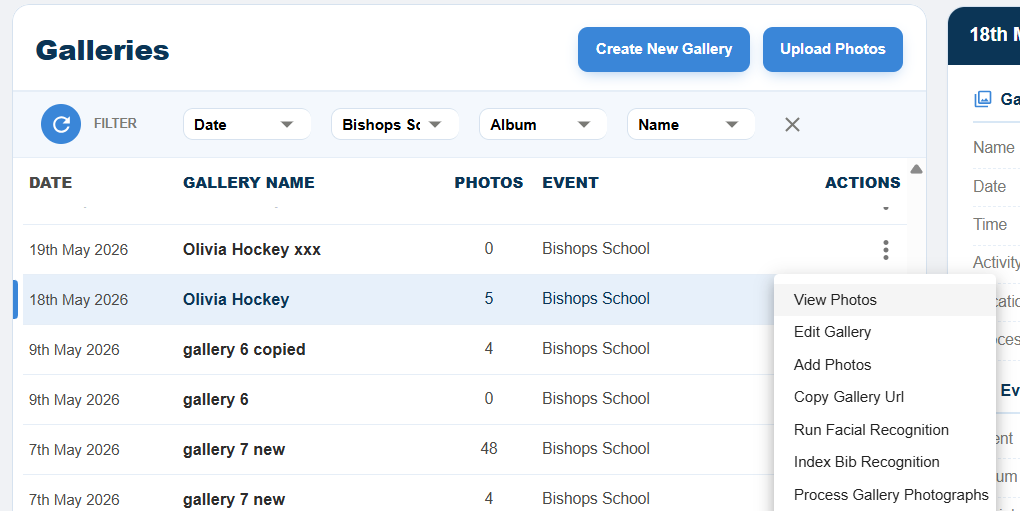
Bib Recognition is different and needs to be kicked off manually. And, from time to time the indexing of your photos gets interrupted. This is easy to fix. In both instances you go to “Galleries” click on the actions 3 dots next to the gallery and select either “Run Facial Recognition” or “Index Bib Recognition”. Note it is normal to see fewer photos indexed than photos loaded eg 1072 of 1080, as it will not index photos where faces are not present.